For accountancy practices and bookkeepers
From fee calculator to cash in the bank.
Sixteen ready-to-use tools for pricing, billing, credit control and recurring fees, built with accountants who have priced thousands of jobs and chased every kind of debtor. Excel workbooks with a worked example and a user guide for every one.
Built for the people who price the work and collect the cash
Partners and directors
Fees that cover the work, and a fee review that fixes the under-priced clients.
Practice managers
Billing on time, debtors chased and lock-up falling month by month.
Bookkeepers
Clear fixed fees and monthly direct debits, with nothing left unbilled.
The toolkit
Sixteen tools, from fee calculator to cash in the bank
Every tool is a ready-to-use Excel workbook with a filled-in worked example and a PDF user guide. Buy one tool, a bundle of four or the whole desk.
Fee calculator bundle
Price every client fairly and consistently.Fee calculator
Fees that reflect the work, not guesswork.
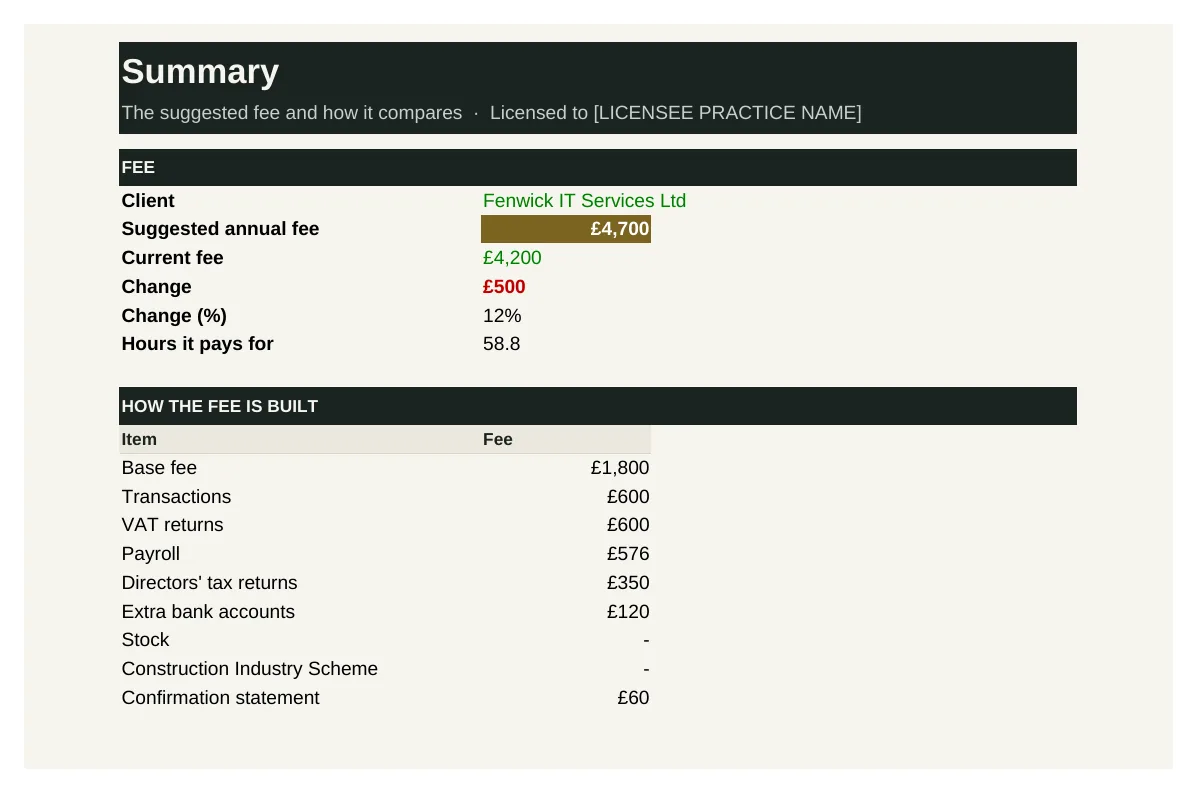
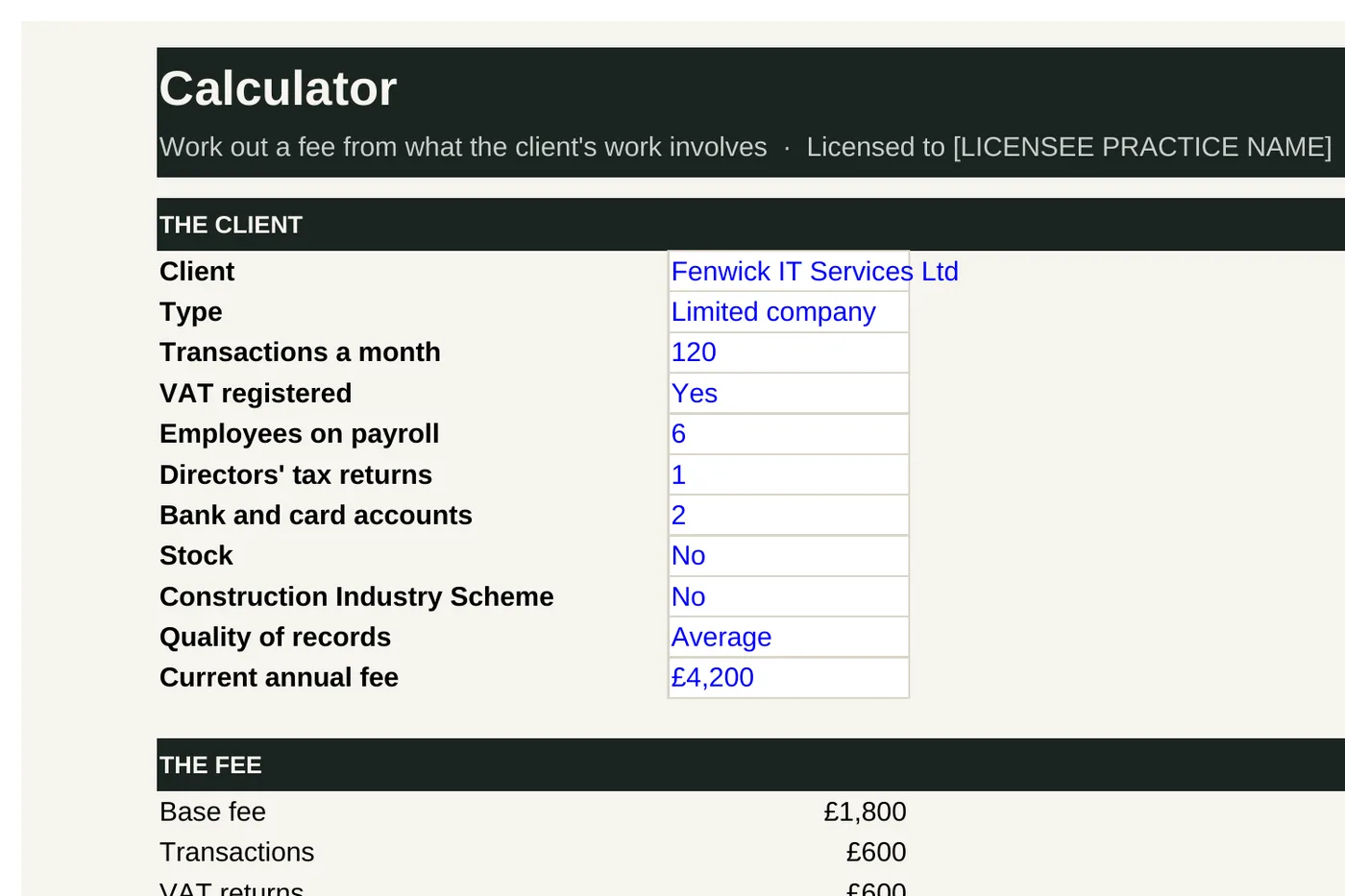
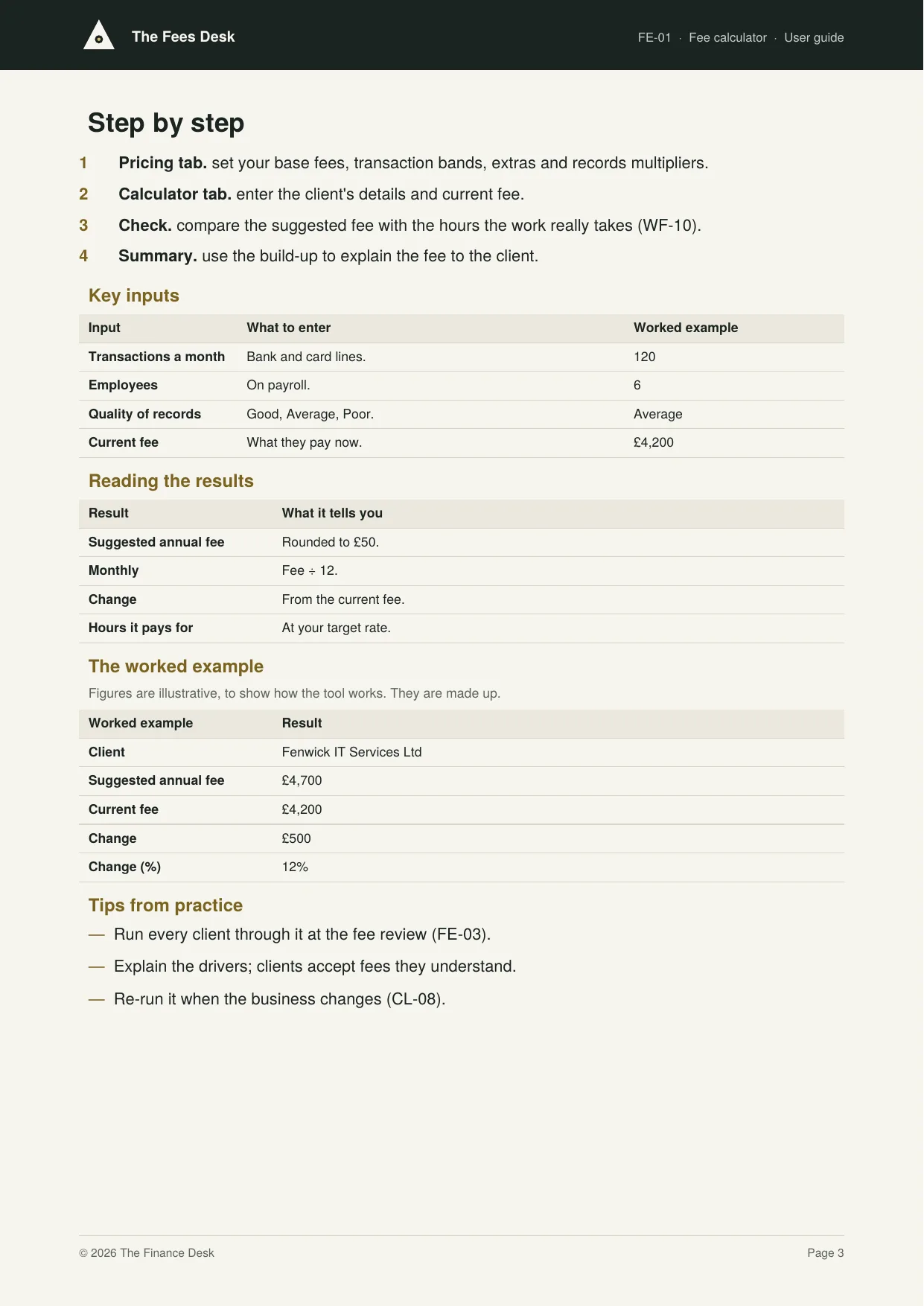
FE-01 works out a fee from what the client's work involves: a base fee by type, then transactions a month, VAT, payroll, directors' tax returns, extra bank accounts, stock and CIS, adjusted for the quality of their records. It compares the result with the current fee and shows how many hours it pays for at your target rate.
Who it's for: Partners pricing new clients and reviewing existing fees.
You enter: Transactions a month, Employees, Quality of records, Current fee.
You get: Suggested annual fee, Monthly, Change, Hours it pays for.
Tabs: Summary · Pricing · Calculator
Hourly rate calculator
Know what an hour costs before you price it.
FE-02 works out what each person's chargeable hour costs, from salary, on-costs, a share of overheads and chargeable hours, and the charge-out rate needed to hit your target margin. It flags current rates below what's needed and shows the fee income the practice needs.
Who it's for: Partners setting charge-out rates and fees.
You enter: Salary, Chargeable, Overheads, Target margin.
You get: Cost per chargeable hour, Charge-out rate, Blended rate, Fees needed.
Tabs: Summary · Rates
Fee review planner
An annual fee review that fixes under-priced clients.
FE-03 plans the annual fee review: each client's current fee, last increase and last year's fee per hour. It applies a standard increase, a bigger one (up to a cap) for clients paying below your target rate, and tracks letters sent and increases agreed.
Who it's for: Partners reviewing fees each year.
You enter: Fee per hour last year, Standard increase, Target fee per hour, Cap.
You get: Increase, New fee, Uplift, Status.
Tabs: Summary · Review
Fixed fee and time comparison
Find the fixed fees that don't cover the work.
FE-04 compares each fixed fee with the time the job really took, valued at your target rate. It shows the fee per hour for each job, flags jobs under target or losing money, and summarises by service.
Who it's for: Partners reviewing pricing.
You enter: Fixed fee, Hours spent, Target rate, Threshold.
You get: Time value, Fee per hour, Result, By service.
Tabs: Summary · Jobs
WIP and billing bundle
Bill the work as soon as it's done.WIP register
See the money sitting in unbilled work.
FE-05 values work in progress on fixed-fee jobs: the share of the fee earned at the job's stage, less anything already billed. It ages WIP, flags filed jobs still unbilled and WIP over 90 days, and totals WIP by age and owner.
Who it's for: Partners and practice managers managing cash.
You enter: Fee, Stage, Billed so far, Share earned.
You get: Earned, WIP, Bill now, By age.
Tabs: Summary · WIP · Stages
Billing schedule
Bill on time, every time.
FE-06 sets out how each client is billed (monthly, quarterly, annually or on completion), the amount and the next bill date. It lists bills due this month and completed jobs not yet billed.
Who it's for: Whoever raises the practice's invoices.
You enter: Billing, Amount, Next bill, Job completed.
You get: Status, Value to bill, By plan, To bill.
Tabs: Summary · Billing
Invoice log
Every invoice, and whether it's been paid.
FE-07 logs every invoice: number, date, client, what it's for and the net amount. It adds VAT, works out the due date from your payment terms, and shows what is paid, due and overdue, with totals by month.
Who it's for: Whoever bills and chases payment.
You enter: Net, Date, Paid, Terms.
You get: VAT and total, Due, Status, By month.
Tabs: Summary · Invoices
Disbursements log
No more paying clients' costs out of your own pocket.
FE-08 logs every cost paid on a client's behalf (filing fees, identity checks, searches, courier) and whether it is recharged. It lists items still to bill and totals what was absorbed.
Who it's for: Whoever pays filing fees and costs for clients.
You enter: What, Amount, Recharge, Billed on invoice.
You get: To bill, Absorbed, Status, Logged.
Tabs: Summary · Disbursements
Debtors and lock-up bundle
Collect what you're owed, sooner.Debtor ageing
Know who owes you, and for how long.
FE-09 ages every unpaid invoice into 0 to 30, 31 to 60, 61 to 90 and over 90 days. It totals what's owed in each band, shows the share over 60 days and lists the biggest balances to chase.
Who it's for: Partners and whoever does credit control.
You enter: Invoice, Total, Paid so far, Date.
You get: Balance, Age, Over 90 days, Share over 60.
Tabs: Summary · Debtors
Credit control chaser log
A steady, polite credit control routine.
FE-10 lists overdue invoices and works out the next step for each: first reminder, second reminder, final notice, phone call or stop work. A promise to pay pauses the chase until the date promised.
Who it's for: Whoever chases the practice's unpaid invoices.
You enter: Reminders, Promised to pay by, Stop work after, Due.
You get: Days late, Next step, Stop work, Overdue value.
Tabs: Summary · Chasing
Lock-up calculator
Turn work into cash faster.
FE-11 works out lock-up each month: WIP days and debtor days, the days of fees tied up in unbilled work and unpaid invoices. It compares lock-up with your target and shows the cash that would be freed by hitting it.
Who it's for: Partners managing the practice's cash.
You enter: Fees billed, WIP, Debtors, Target.
You get: WIP days, Debtor days, Lock-up days, Cash above target.
Tabs: Summary · Lock-up
Payment plan tracker
Arrears paid off, not written off.
FE-12 tracks clients paying off what they owe in monthly instalments: the amount, number of instalments, start date and payments made. It shows each instalment, what's still owed, the next due date and whether the client is behind.
Who it's for: Whoever agrees payment plans with clients.
You enter: Amount owed, Instalments, First instalment, Paid so far.
You get: Each instalment, Still owed, Next due, Status.
Tabs: Summary · Plans
Recurring fees bundle
Steady monthly income all year.Monthly fee planner
Steady monthly income instead of a January cash crunch.
FE-13 spreads each client's annual fee (plus any one-off extras) into a monthly amount, totals the practice's monthly income from monthly payers and shows the share of fees paid monthly.
Who it's for: Partners moving clients onto monthly fees.
You enter: Annual fee, Paying monthly, Monthly from, Extras.
You get: Monthly amount, Monthly income, Share of fees, Paid so far.
Tabs: Summary · Monthly fees
Direct debit schedule
Collections on time, failures caught the same day.
FE-14 lists each client's direct debit: monthly amount, collection day, when the mandate was set up and its status. It totals the collections expected each month by collection day and lists pending mandates and failed collections.
Who it's for: Whoever manages the practice's direct debits.
You enter: Monthly amount, Collected on, Status, Mandate set up.
You get: Expected each month, By collection day, Pending, Failed.
Tabs: Summary · Direct debits
Recurring revenue tracker
Watch the practice's recurring income grow.
FE-15 tracks monthly recurring fees: every new client, increase, decrease and loss. It builds a month-by-month bridge from opening to closing recurring fees, and shows current recurring fees, the annualised figure, growth and what was lost.
Who it's for: Partners tracking growth.
You enter: Change, Change in monthly fees, Opening, Date.
You get: Now (monthly), Annualised, Growth, Lost.
Tabs: Summary · Changes · Months
Fees dashboard
Fees and cash, on one page.
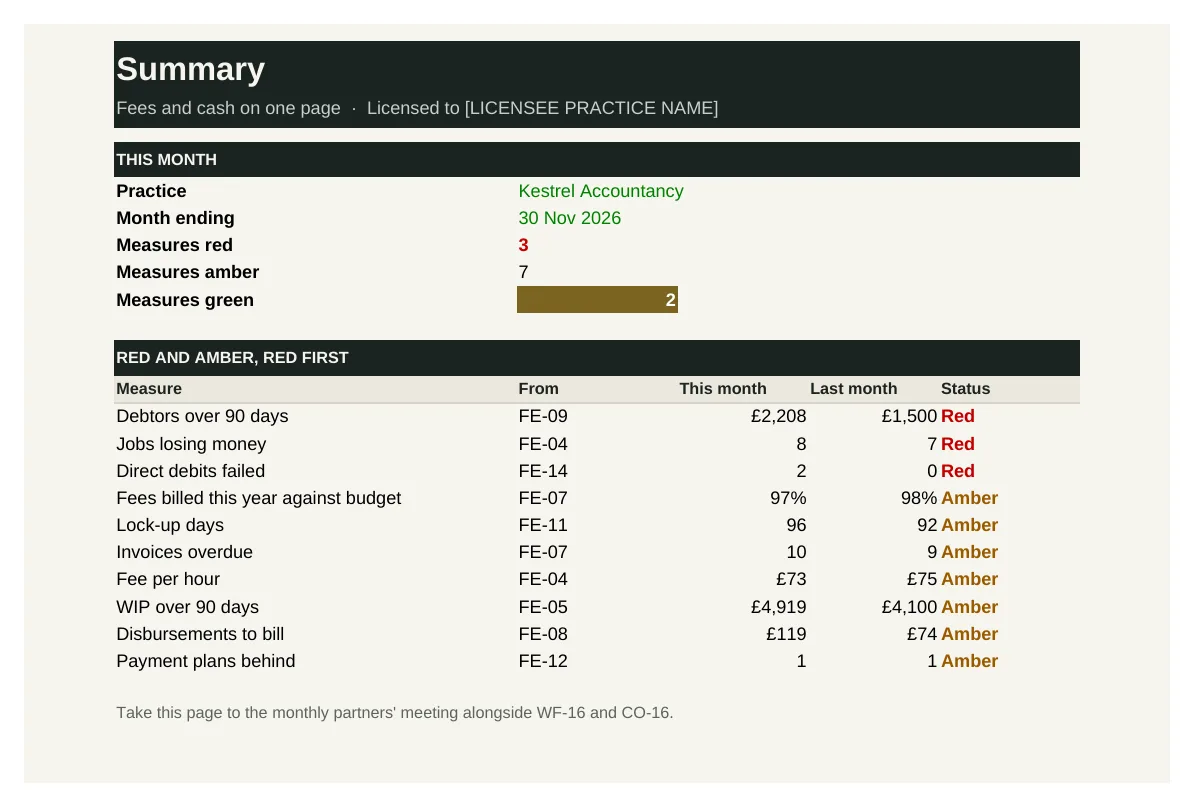
FE-16 brings the key fee and cash measures together: fees against budget, lock-up and debtor days, old debts, overdue invoices, fee per hour, loss-making jobs, old WIP, disbursements to bill, recurring fees, failed direct debits and payment plans. Each is rated red, amber or green.
Who it's for: Partners reviewing the practice's fees and cash each month.
You enter: This month, Green if within, Amber if within, Better if.
You get: Status, Measures red, List, Last month.
Tabs: Summary · Measures
See inside
Real screens from the workbooks
Taken straight from the tools with the worked example filled in, so you can see exactly what you get before you buy.
In every tool
How it works
1 — Download
Buy a single tool, a bundle or the whole desk. Each one is licensed to your practice and sent by email.
2 — Set up once
Enter your pricing rules, hourly costs and clients, using the user guide.
3 — Price, bill and collect
Price every client consistently, bill on time and chase every debt the same way.
Pricing
Buy what you need, or get everything
Single tool
£95–£295
One workbook with its user guide and worked example.
Start here
Bundle of four
£295–£595
Four tools that work together. The fee calculator bundle is the place to start.
Full Fees Desk
£1,495
All 16 tools and guides, yours to keep, with 12 months of updates and the monthly Q&A call. Then £395 a year to keep updating.
The Full Suite
£5,950
All six desks and all 96 tools, yours to keep, with 12 months of updates and the monthly Q&A call. Then £1,190 a year to keep updating.
Founding members: £4,450, with updates at £890 a year for life, for the first 50.
Set-up service
Your figures loaded for you · from £1,500
We load the tools with your own clients, services, fees, team and rates, so they're ready to use from day one.
Prices exclude VAT. Single tools, bundles and desks are for one practice and yours to keep. See pricing for every desk
Written by people who have done the job
The Fees Desk is built with accountants who have priced work for every kind of client, run fee reviews and brought lock-up down month by month.
Every tool is built from that experience: the records and controls a well-run practice relies on, in a form you can pick up and use the same week.
Become a founding member
The first 50 founding members get The Full Suite, all six desks and 96 tools, for £4,450 instead of £5,950, with updates at £890 a year fixed for life.