For accountancy practices and tax advisers
From review checklist to root cause.
Sixteen ready-to-use tools for reviewing accounts and tax returns, file reviews, complaints and errors, built with accountants who have reviewed thousands of files and handled the complaints that follow a mistake. Excel workbooks with a worked example and a user guide for every one.
Built for the people who sign off the work
Partners and reviewers
Every set of accounts and every return checked the same way before it goes out.
Quality and compliance leads
File reviews that actually happen, with findings that lead to a fix.
Practice managers
Complaints and errors handled fairly, on time and on record.
The toolkit
Sixteen tools, from review checklist to root cause
Every tool is a ready-to-use Excel workbook with a filled-in worked example and a PDF user guide. Buy one tool, a bundle of four or the whole desk.
Accounts review checklists bundle
Accounts right first time.Accounts review checklist
Accounts that are right first time.
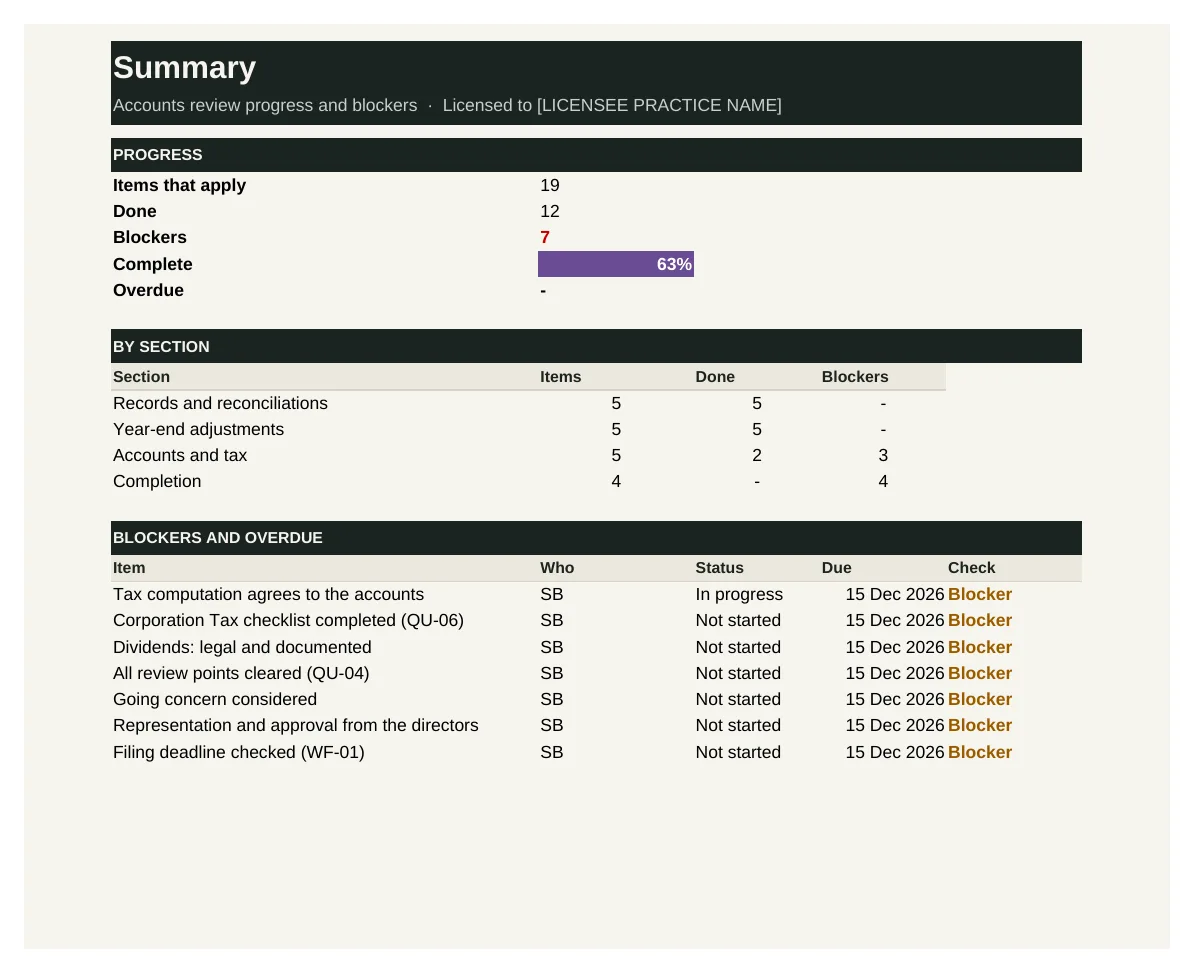
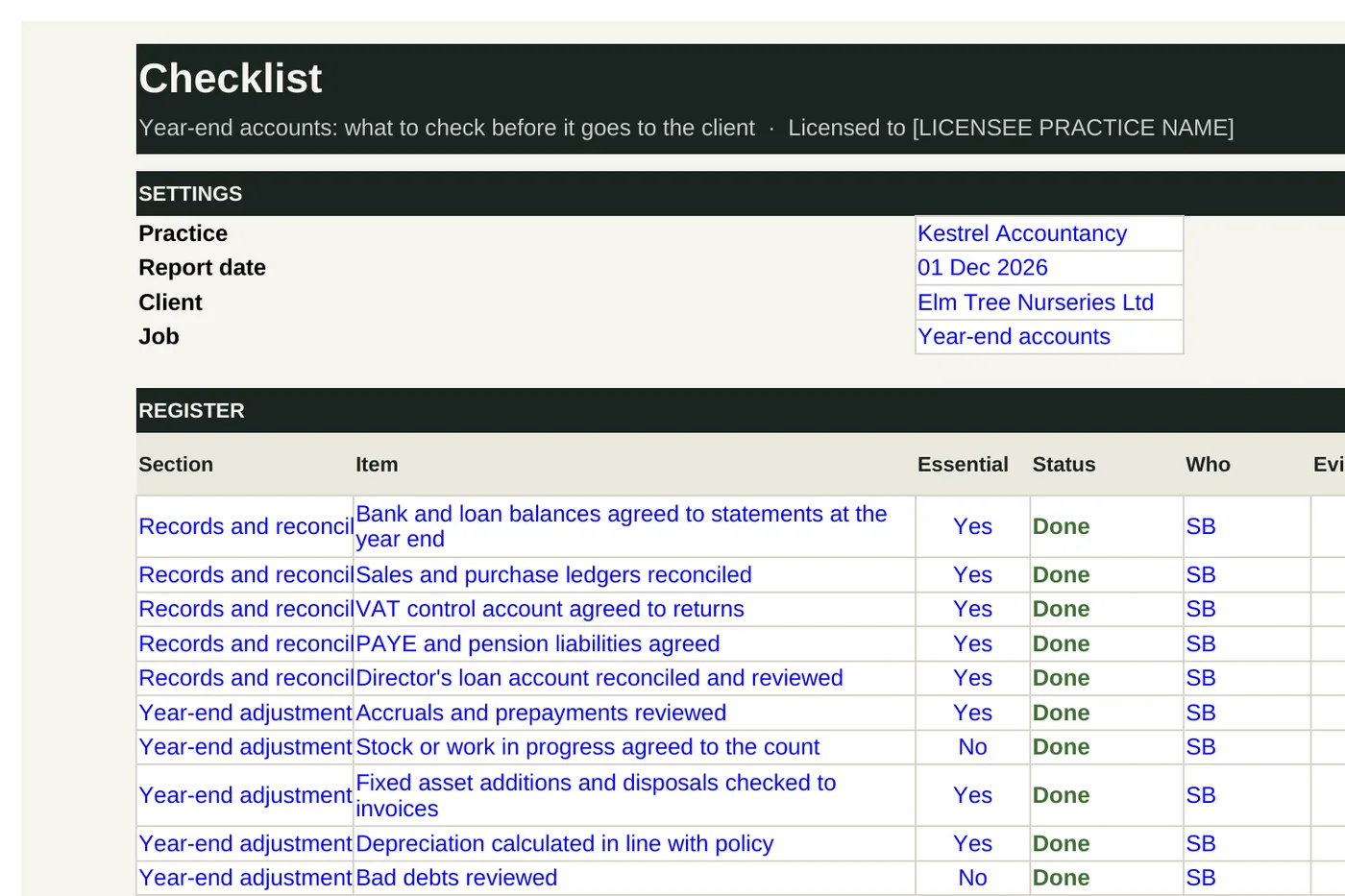
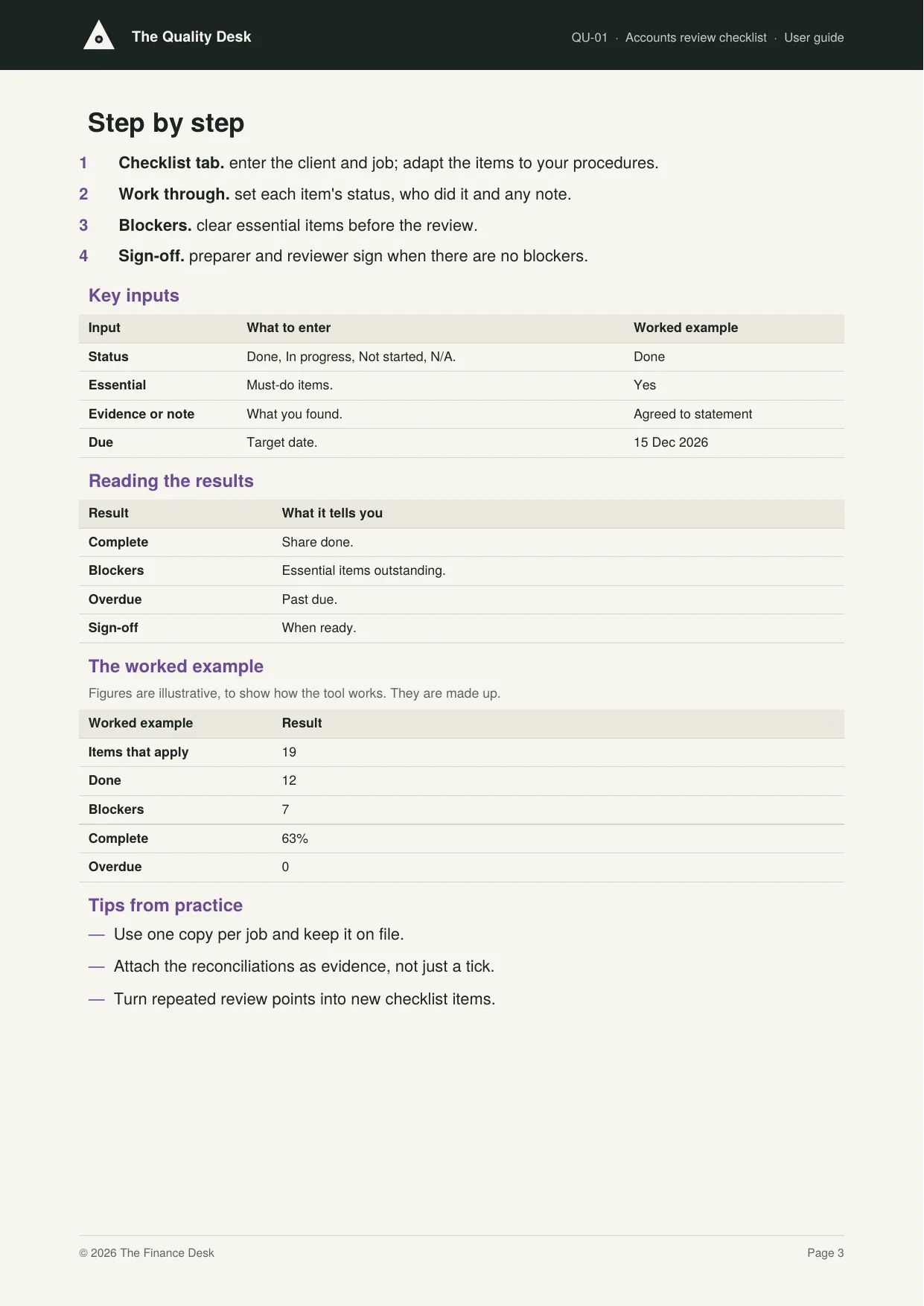
QU-01 is the year-end accounts review checklist: records and reconciliations, year-end adjustments, accounts and tax, and completion, linking to the disclosure checklist, analytical review and review points log. Essential items not done are blockers, and the preparer and reviewer sign off when it is complete.
Who it's for: Preparers and reviewers of limited company accounts.
You enter: Status, Essential, Evidence or note, Due.
You get: Complete, Blockers, Overdue, Sign-off.
Tabs: Summary · Checklist · Sign-off
Accounts disclosure checklist
No missing statement, no rejected filing.
QU-02 is a disclosure checklist for small company (FRS 102 Section 1A) and micro-entity (FRS 105) accounts: the balance sheet statements, the notes for each regime and filing. Mark the other regime's items N/A. Essential items not done are blockers, and the preparer and reviewer sign off when it is complete.
Who it's for: Preparers of small and micro-entity company accounts.
You enter: Status, Essential, Evidence or note, Due.
You get: Complete, Blockers, Overdue, Sign-off.
Tabs: Summary · Checklist · Sign-off
Analytical review
Spot the number that doesn't make sense.
QU-03 compares this year with last year line by line, works out the change in pounds and percent, and flags changes above both your limits until they are explained. It also shows the gross margin for both years.
Who it's for: Preparers and reviewers of year-end accounts.
You enter: This year, Last year, Limits, Explanation.
You get: Change, Status, Gross margin, Still to explain.
Tabs: Summary · Review
Review points log
Every review point answered before anything is filed.
QU-04 logs every review point: the job, the point, who raised it, the preparer's response and when it was cleared. It flags points left open too long and lists everything still open.
Who it's for: Reviewers and preparers.
You enter: Review point, Response, Cleared, Overdue after.
You get: Days open, Status, Open, Overdue.
Tabs: Summary · Points
Tax return review bundle
Every return checked before it's filed.Self Assessment review checklist
Self Assessment returns checked the same way, every time.
QU-05 is the Self Assessment review checklist: income sources, reliefs and adjustments, payments on account and completion, with links to the variance check and MTD status. Essential items not done are blockers, and the preparer and reviewer sign off when it is complete.
Who it's for: Preparers and reviewers of personal tax returns.
You enter: Status, Essential, Evidence or note, Due.
You get: Complete, Blockers, Overdue, Sign-off.
Tabs: Summary · Checklist · Sign-off
Corporation Tax review checklist
Corporation Tax returns that match the accounts.
QU-06 is the Corporation Tax review checklist: the computation, reliefs and charges (including tax on director's loans), the CT600 and completion. Essential items not done are blockers, and the preparer and reviewer sign off when it is complete.
Who it's for: Preparers and reviewers of company tax returns.
You enter: Status, Essential, Evidence or note, Due.
You get: Complete, Blockers, Overdue, Sign-off.
Tabs: Summary · Checklist · Sign-off
VAT return review checklist
VAT returns right before they're submitted.
QU-07 is the VAT return review checklist: the figures, the scheme and period (including reverse charge and flat rate) and the submission through Making Tax Digital software. Essential items not done are blockers, and the preparer and reviewer sign off when it is complete.
Who it's for: Preparers and reviewers of VAT returns.
You enter: Status, Essential, Evidence or note, Due.
You get: Complete, Blockers, Overdue, Sign-off.
Tabs: Summary · Checklist · Sign-off
Tax return variance check
Catch the return that looks wrong before HMRC does.
QU-08 compares each Self Assessment return with last year: total income and tax, and the change in each. It flags big changes in tax and any reduction in payments on account until they are explained.
Who it's for: Reviewers of personal tax returns.
You enter: Income and tax, Payments on account reduced, Limit, Explanation.
You get: Income change, Tax change, Check, To check.
Tabs: Summary · Returns
File reviews bundle
Learn from finished work.Cold file review
Learn from finished work, not just catch mistakes.
QU-09 records cold file reviews, after the work is done, scoring each file against ten criteria from records and adjustments to client approval, AML checks and advice recorded. It grades each file, shows where criteria are most often missed and compares scores by preparer.
Who it's for: Partners and senior staff carrying out file reviews.
You enter: Criteria, Reviewed by, Main finding, Thresholds.
You get: Score, Grade, By criterion, By preparer.
Tabs: Summary · Reviews
File review schedule
File reviews that actually happen.
QU-10 plans how many of each person's files are reviewed each year, who reviews them, and tracks reviews done each quarter against what should have been done by now.
Who it's for: The partner responsible for quality.
You enter: Files to review, Done, Quarters finished, Reviewed by.
You get: Done, Due by now, Status, Planned.
Tabs: Summary · Plan
Quality findings and actions
Every finding leads to a fix.
QU-11 brings quality findings from file reviews, complaints, errors and compliance reviews into one register, each with an area, severity, action, owner and due date. It lists open and overdue actions and high-severity findings still open.
Who it's for: The partner responsible for quality.
You enter: Source, Severity, Action, Due.
You get: Status, High severity open, By source, Open actions.
Tabs: Summary · Findings
Reviewer sign-off register
Proof that every job was reviewed before it went out.
QU-12 records who prepared, reviewed and (where needed) approved each job, and when it was filed. It flags jobs reviewed by their own preparer, filed without review or filed without a required partner approval.
Who it's for: The partner responsible for quality.
You enter: Prepared by, Reviewed by, Partner approval needed, Filed.
You get: Check, Rate, Breaches, List.
Tabs: Summary · Sign-offs
Complaints and errors bundle
Handle problems fairly and fix the cause.Complaints log
Complaints handled fairly, on time and on record.
QU-13 logs every complaint: who, what about, when it was acknowledged and answered, the outcome and any redress. It works out the acknowledgement and response deadlines, flags anything overdue and shows complaints by subject.
Who it's for: The partner who handles complaints.
You enter: Complaint, Acknowledged, Final response, Redress.
You get: Response due, Status, By subject, Redress.
Tabs: Summary · Complaints
Errors and breaches log
Own the mistakes, and stop them happening again.
QU-14 logs errors made by the practice: what went wrong, any penalty or interest and who pays, whether the client and insurer were told, the cause and when it was put right. It shows errors by cause and the cost to the practice.
Who it's for: The partner responsible for quality and risk.
You enter: What went wrong, Penalty or interest, Who pays, Cause.
You get: Status, Cost, By cause, Open.
Tabs: Summary · Errors
Root cause tracker
Fix causes, not symptoms.
QU-15 brings complaints, errors, file review findings and repeated review points together by root cause and area. A matrix shows which causes come up where, and the Summary names the most common cause to tackle first.
Who it's for: The partner responsible for quality.
You enter: From, Area, Root cause, Note.
You get: Most common cause, By root cause, By area, Matrix.
Tabs: Summary · Incidents · Matrix
Quality dashboard
Quality, measured every month.
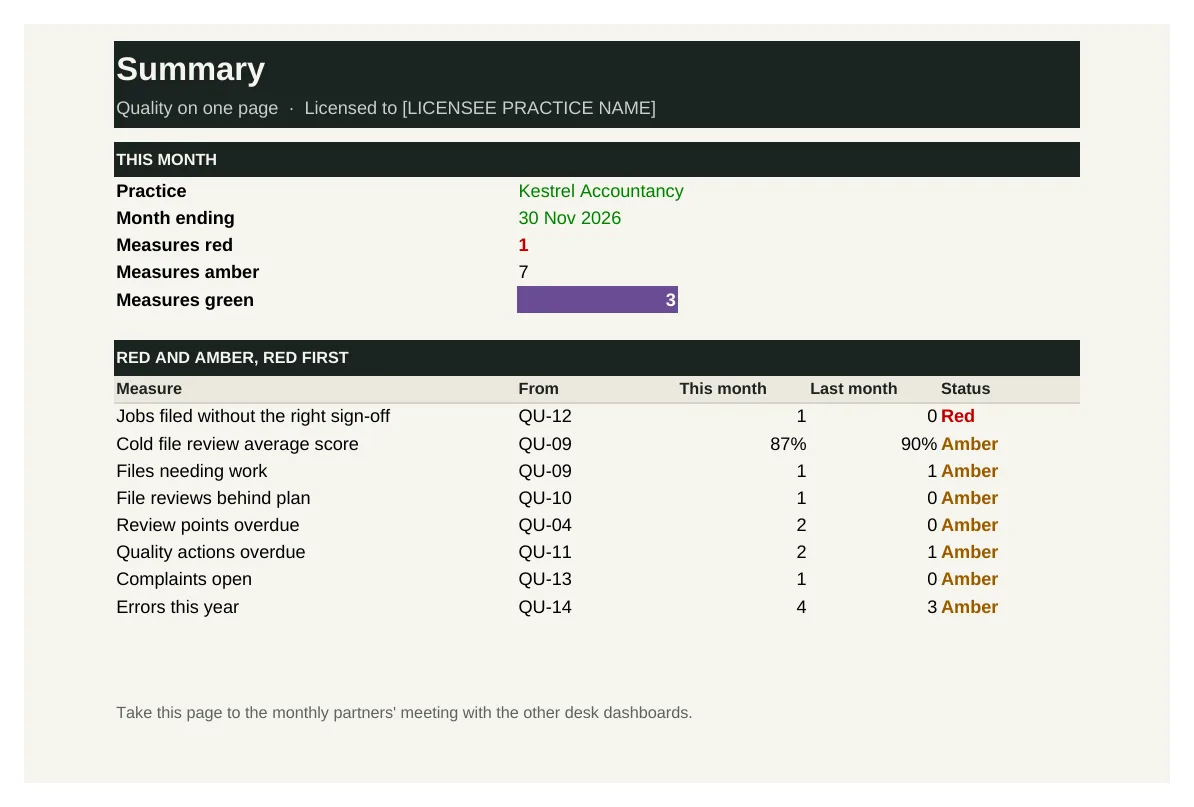
QU-16 brings the quality measures together: file review scores, reviews behind plan, review points open and overdue, sign-off breaches, overdue actions, complaints and errors. Each is rated red, amber or green against thresholds you set.
Who it's for: The partner responsible for quality, and the partners' meeting.
You enter: This month, Green if within, Amber if within, Better if.
You get: Status, Measures red, List, Last month.
Tabs: Summary · Measures
See inside
Real screens from the workbooks
Taken straight from the tools with the worked example filled in, so you can see exactly what you get before you buy.
In every tool
How it works
1 — Download
Buy a single tool, a bundle or the whole desk. Each one is licensed to your practice and sent by email.
2 — Set up once
Set your reviewers, sign-off rules and checklists, using the user guide.
3 — Review and improve
Review every job before it goes out, and log every finding, complaint and error.
Pricing
Buy what you need, or get everything
Single tool
£95–£295
One workbook with its user guide and worked example.
Start here
Bundle of four
£395–£495
Four tools that work together. The accounts review checklists bundle is the place to start.
Full Quality Desk
£1,495
All 16 tools and guides, yours to keep, with 12 months of updates and the monthly Q&A call. Then £395 a year to keep updating.
The Full Suite
£5,950
All six desks and all 96 tools, yours to keep, with 12 months of updates and the monthly Q&A call. Then £1,190 a year to keep updating.
Founding members: £4,450, with updates at £890 a year for life, for the first 50.
Set-up service
Your figures loaded for you · from £1,500
We load the tools with your own clients, services, fees, team and rates, so they're ready to use from day one.
Prices exclude VAT. Single tools, bundles and desks are for one practice and yours to keep. See pricing for every desk
Written by people who have done the job
The Quality Desk is built with accountants who have reviewed files for practices of every size and handled the complaints and errors that follow a missed check.
Every tool is built from that experience: the records and controls a well-run practice relies on, in a form you can pick up and use the same week.
Become a founding member
The first 50 founding members get The Full Suite, all six desks and 96 tools, for £4,450 instead of £5,950, with updates at £890 a year fixed for life.