For accountancy practices and their partners
From client profitability to practice dashboard.
Sixteen ready-to-use tools for profitability, utilisation, forecasting and management reporting, built with accountants who have run the numbers on their own practices, not just their clients'. Excel workbooks with a worked example and a user guide for every one.
Built for the people who run the practice as a business
Partners and directors
Know which clients, services and people make the money, and plan the year ahead.
Practice managers
Utilisation, recovery, cash and budget reported the same way every month.
Growing practices
Know when to hire, which clients to grow and which to re-price.
The toolkit
Sixteen tools, from client profitability to practice dashboard
Every tool is a ready-to-use Excel workbook with a filled-in worked example and a PDF user guide. Buy one tool, a bundle of four or the whole desk.
Client profitability bundle
Know which clients and services pay.Client profitability analysis
Know which clients make you money.
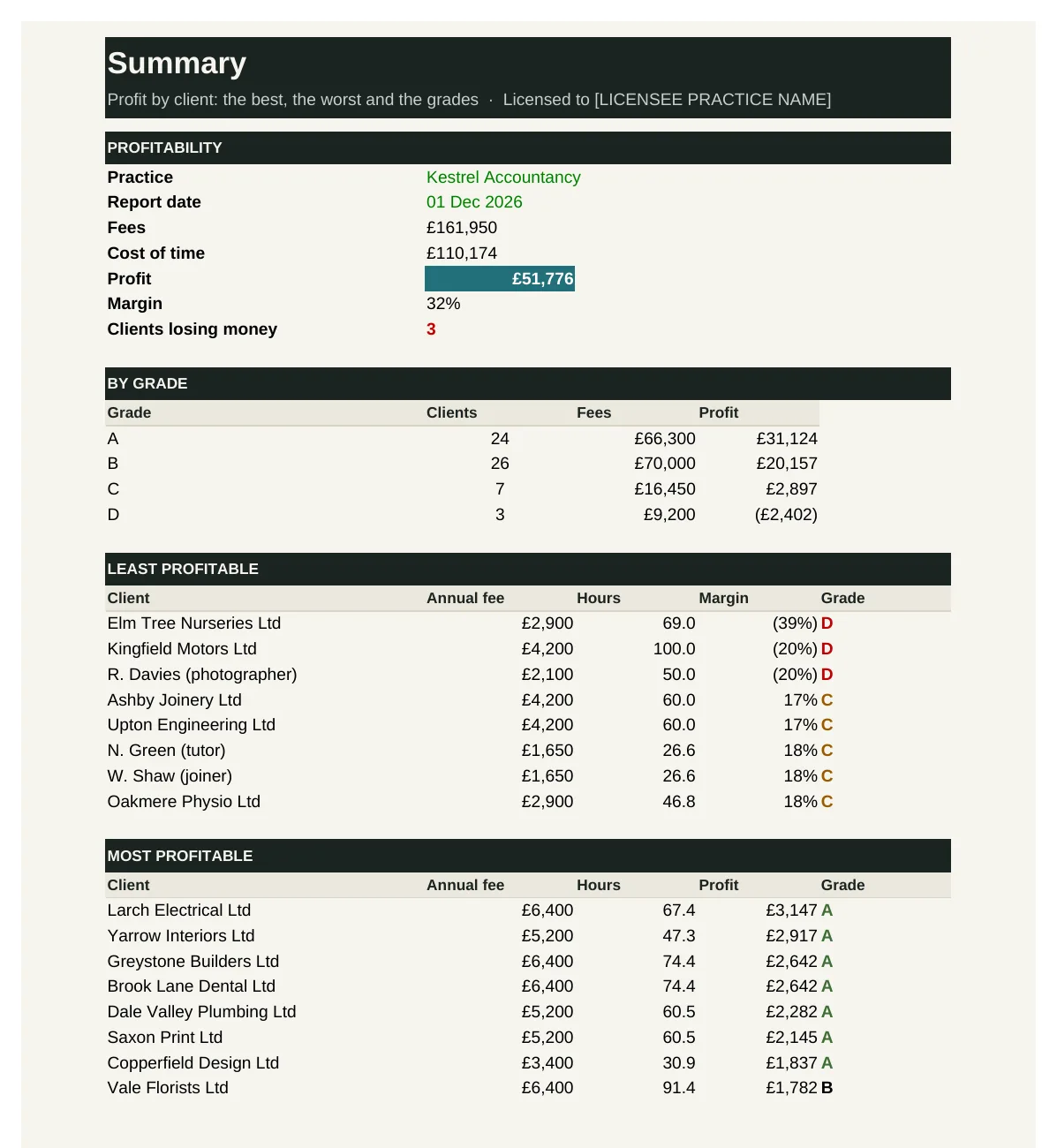
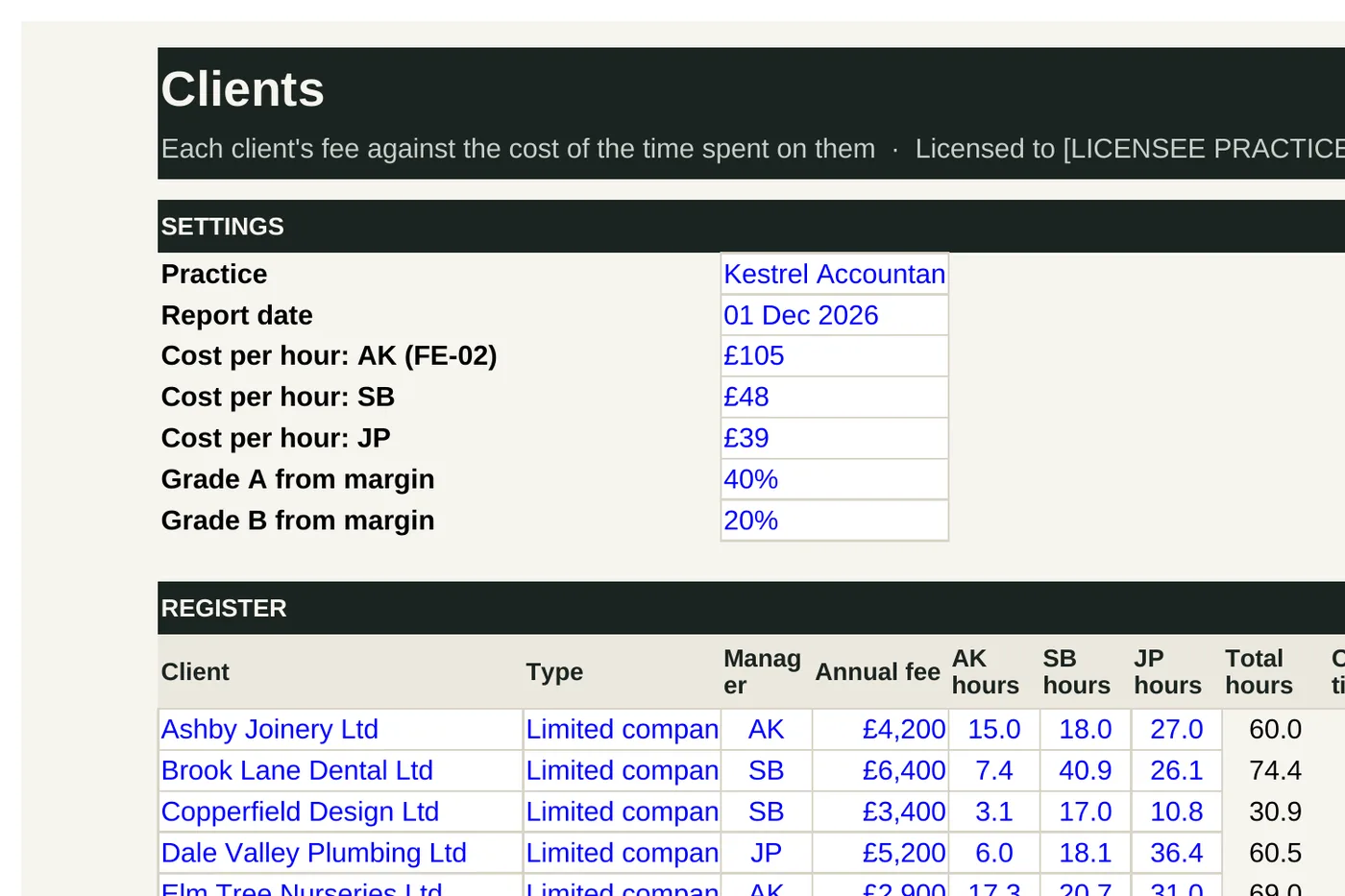
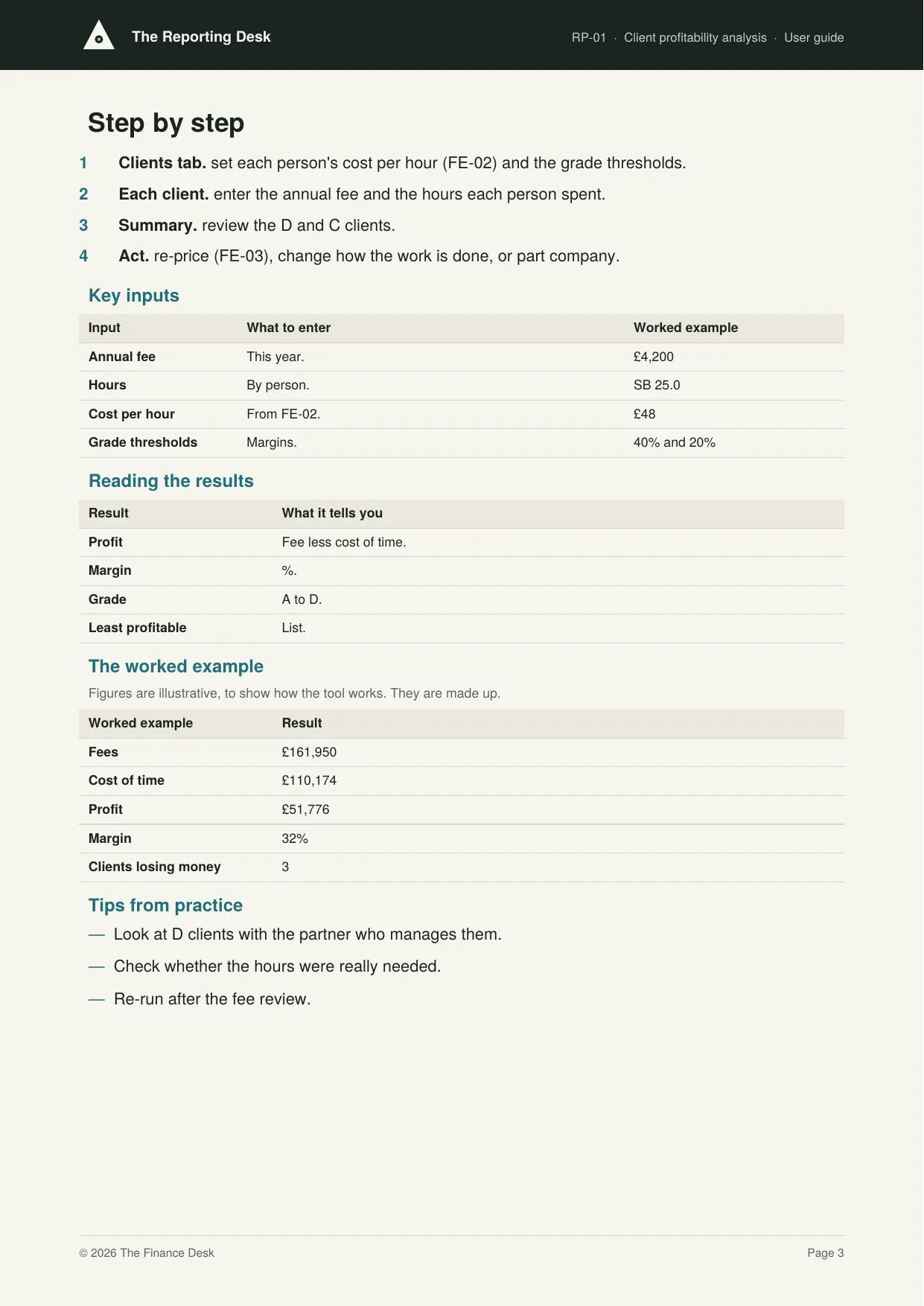
RP-01 compares each client's fee with the cost of the time spent on them, using each person's cost per hour. It works out profit and margin, grades clients A to D, and lists the least and most profitable.
Who it's for: Partners deciding where to spend time, and which fees to review.
You enter: Annual fee, Hours, Cost per hour, Grade thresholds.
You get: Profit, Margin, Grade, Least profitable.
Tabs: Summary · Clients
Service line profitability
Know which services to grow and which to fix.
RP-02 compares fees with the cost of time for each service: accounts, tax, VAT, payroll, bookkeeping, advisory and company secretarial. It shows profit, margin, fee per hour and each service's share of fees.
Who it's for: Partners planning the practice's services.
You enter: Fees, Hours, Blended cost per hour, Service.
You get: Profit, Margin, Fee per hour, Share of fees.
Tabs: Summary · Services
Fee per hour by client
Find the clients paying least for your time.
RP-03 works out each client's fee per hour, compares it with your target rate, and shows the extra fee needed to reach target. It lists the lowest fee per hour clients and compares managers.
Who it's for: Partners and managers preparing the fee review.
You enter: Annual fee, Hours, Target, Well below.
You get: Fee per hour, Against target, Fee needed, By manager.
Tabs: Summary · Clients
Client ranking (ABC)
Give your best clients your best attention.
RP-04 ranks clients by fee and groups them: A clients make up the first 60% of fees, B take it to 90%, and the rest are C. It shows how many clients and how much fee sit in each class.
Who it's for: Partners deciding how to serve different clients.
You enter: Annual fee, A ends at, B ends at, Manager.
You get: Rank, Cumulative share, Class, By class.
Tabs: Summary · Clients
Team utilisation bundle
See where the hours go.Utilisation tracker
See where the hours go.
RP-05 tracks utilisation month by month: chargeable hours against hours available for each person, against their target. It shows the team's utilisation for the year and flags months well below target.
Who it's for: Partners and managers responsible for team performance.
You enter: Hours available, Chargeable hours, Target, Month.
You get: Utilisation, Against target, Team utilisation, By person.
Tabs: Summary · Months
Timesheet analysis
See where the non-chargeable hours go.
RP-06 analyses timesheets for a period: hours by person and by activity (client work, practice admin, training, business development and holiday or sickness). It shows the chargeable share of hours worked.
Who it's for: Partners and practice managers.
You enter: Activity, Hours, Client, Period.
You get: Hours recorded, Client work, Chargeable share, By activity.
Tabs: Summary · Timesheets
Recovery rate tracker
See how much of your time you actually get paid for.
RP-07 values each client's time at charge-out rates and compares it with what was billed. It shows recovery for each client and overall, the time written off, and the clients with the lowest recovery.
Who it's for: Partners reviewing pricing and efficiency.
You enter: Hours, Billed, Charge-out rates, Target recovery.
You get: Time value, Recovery, Written off, Lowest recovery.
Tabs: Summary · Recovery
Team KPI scorecard
A fair, simple scorecard for every person.
RP-08 is a scorecard for each person: utilisation, recovery, jobs filed on time, review points per job and training hours, each against that person's target, marked Met or Missed.
Who it's for: Partners running appraisals and one-to-ones.
You enter: Actual, Target, Better if, Period.
You get: Met or Missed, Measures met, Measures missed, By person.
Tabs: Summary · Scorecard
Practice forecast bundle
Plan fees, cash and hiring ahead.Fee income forecast
See next year's income before it arrives.
RP-09 forecasts fee income for the next 12 months from three sources: recurring monthly fees, one-off and on-completion work, and new clients from the weighted pipeline. It compares each month with budget and shows the share that is recurring.
Who it's for: Partners planning the year ahead.
You enter: Recurring, One-off, New clients, Budget.
You get: Forecast, Against budget, Recurring share, Months below budget.
Tabs: Summary · Forecast
Cash flow forecast
No cash surprises in January or July.
RP-10 forecasts cash month by month for a year: fees collected on your usual pattern, then salaries, overheads, PAYE, VAT each quarter, partner drawings and the partner's tax. It shows closing cash, the lowest month and any months below the minimum you want to keep.
Who it's for: Partners managing the practice's cash.
You enter: Collection pattern, Opening cash, Minimum, Partner's tax.
You get: Cash received, Net cash flow, Closing cash, Lowest month.
Tabs: Summary · Cash flow
Budget and actual
Know if the year is on track, month by month.
RP-11 sets the budget and records actual income and costs line by line for each month of the year, totals the year to date, and shows profit against budget and which lines are better or worse.
Who it's for: Partners reviewing the practice's results.
You enter: Budget, Actual, Year starts, Line.
You get: Year to date, Profit, Better (worse), Against budget.
Tabs: Summary · Budget and actual
Capacity and hiring planner
Hire at the right time, not in a panic.
RP-12 works out the hours next year's client base will need (clients by type, hours each, plus growth) and compares them with the team's chargeable hours. It shows the gap and how many full-time people would fill it.
Who it's for: Partners planning growth and recruitment.
You enter: Clients now, Hours each, Growth, Chargeable hours.
You get: Hours needed, Hours available, Gap, New people needed.
Tabs: Summary · Plan
Practice dashboard bundle
The whole practice on one page.Management accounts summary
The month's numbers on one page.
RP-13 is the monthly management summary: fees, costs, profit and margin for each month, with cash, debtors and WIP at each month end. The Summary shows the latest month and the year to date.
Who it's for: Partners at the monthly meeting.
You enter: Fees, Costs, Cash, Debtors and WIP.
You get: Profit, Margin, Year to date, Debtors and WIP.
Tabs: Summary · Months
Client growth tracker
Are you growing, and why are clients leaving?
RP-14 logs every client won and lost with the fee and the source or reason. It works out client numbers now, fees won and lost, churn, and which sources bring in new clients.
Who it's for: Partners tracking growth.
You enter: Won or lost, Annual fee, Source or reason, Start.
You get: Clients now, Fees won and lost, Churn, Wins by source.
Tabs: Summary · Wins and losses
KPI trend
See the direction, not just the number.
RP-15 tracks the practice's key measures month by month (fees, margin, lock-up, utilisation, recovery, clients, overdue deadlines and complaints) and marks each as better, worse or the same compared with last month and three months ago.
Who it's for: Partners reviewing the practice each month.
You enter: Figures, Better if, First month, Measure.
You get: On last month, On three months ago, Worse, Better.
Tabs: Summary · Trend
Practice dashboard
The whole practice on one page.
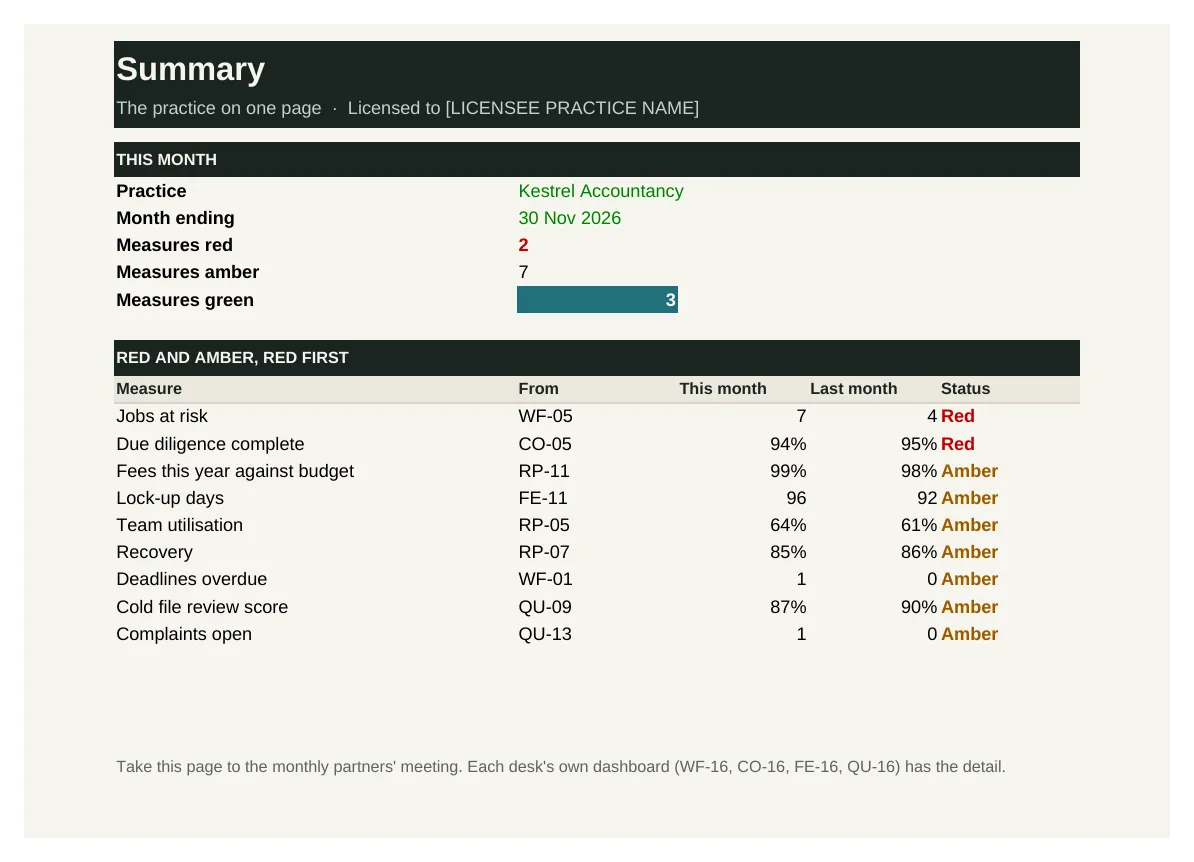
RP-16 is the practice dashboard: the headline measures from all six Finance Desk desks (fees, profit, lock-up, cash, utilisation, recovery, deadlines, jobs at risk, due diligence, quality, complaints, clients and recurring fees), each rated red, amber or green.
Who it's for: Partners at the monthly meeting.
You enter: This month, Green if within, Amber if within, Better if.
You get: Status, Measures red, List, Info.
Tabs: Summary · Measures
See inside
Real screens from the workbooks
Taken straight from the tools with the worked example filled in, so you can see exactly what you get before you buy.
In every tool
How it works
1 — Download
Buy a single tool, a bundle or the whole desk. Each one is licensed to your practice and sent by email.
2 — Set up once
Enter your team's costs and rates, your clients and your budget, using the user guide.
3 — Report and plan
See which clients and services make money, forecast fees and cash, and plan the team.
Pricing
Buy what you need, or get everything
Single tool
£95–£295
One workbook with its user guide and worked example.
Start here
Bundle of four
£495–£595
Four tools that work together. The client profitability bundle is the place to start.
Full Reporting Desk
£1,495
All 16 tools and guides, yours to keep, with 12 months of updates and the monthly Q&A call. Then £395 a year to keep updating.
The Full Suite
£5,950
All six desks and all 96 tools, yours to keep, with 12 months of updates and the monthly Q&A call. Then £1,190 a year to keep updating.
Founding members: £4,450, with updates at £890 a year for life, for the first 50.
Set-up service
Your figures loaded for you · from £1,500
We load the tools with your own clients, services, fees, team and rates, so they're ready to use from day one.
Prices exclude VAT. Single tools, bundles and desks are for one practice and yours to keep. See pricing for every desk
Written by people who have done the job
The Reporting Desk is built with accountants who have run their own practices' numbers: profitability, utilisation, cash and the monthly partners' meeting.
Every tool is built from that experience: the records and controls a well-run practice relies on, in a form you can pick up and use the same week.
Become a founding member
The first 50 founding members get The Full Suite, all six desks and 96 tools, for £4,450 instead of £5,950, with updates at £890 a year fixed for life.