For accountancy practices, bookkeepers and tax advisers
From every deadline to every job done.
Sixteen ready-to-use tools for deadlines, jobs, team capacity and client chasers, built with accountants who have run practices through January and every year end. Excel workbooks with a worked example and a user guide for every one.
Built for the people who get the work out on time
Partners and directors
See every deadline and every job at risk, months before it's urgent.
Managers and seniors
Plan the team's weeks around the deadlines, not the other way round.
Bookkeepers and tax advisers
VAT, payroll and Self Assessment dates for every client in one place.
The toolkit
Sixteen tools, from every deadline to every job done
Every tool is a ready-to-use Excel workbook with a filled-in worked example and a PDF user guide. Buy one tool, a bundle of four or the whole desk.
Deadlines bundle
Every filing and payment date, worked out for you.Statutory deadline tracker
Every client's deadlines, worked out for you.
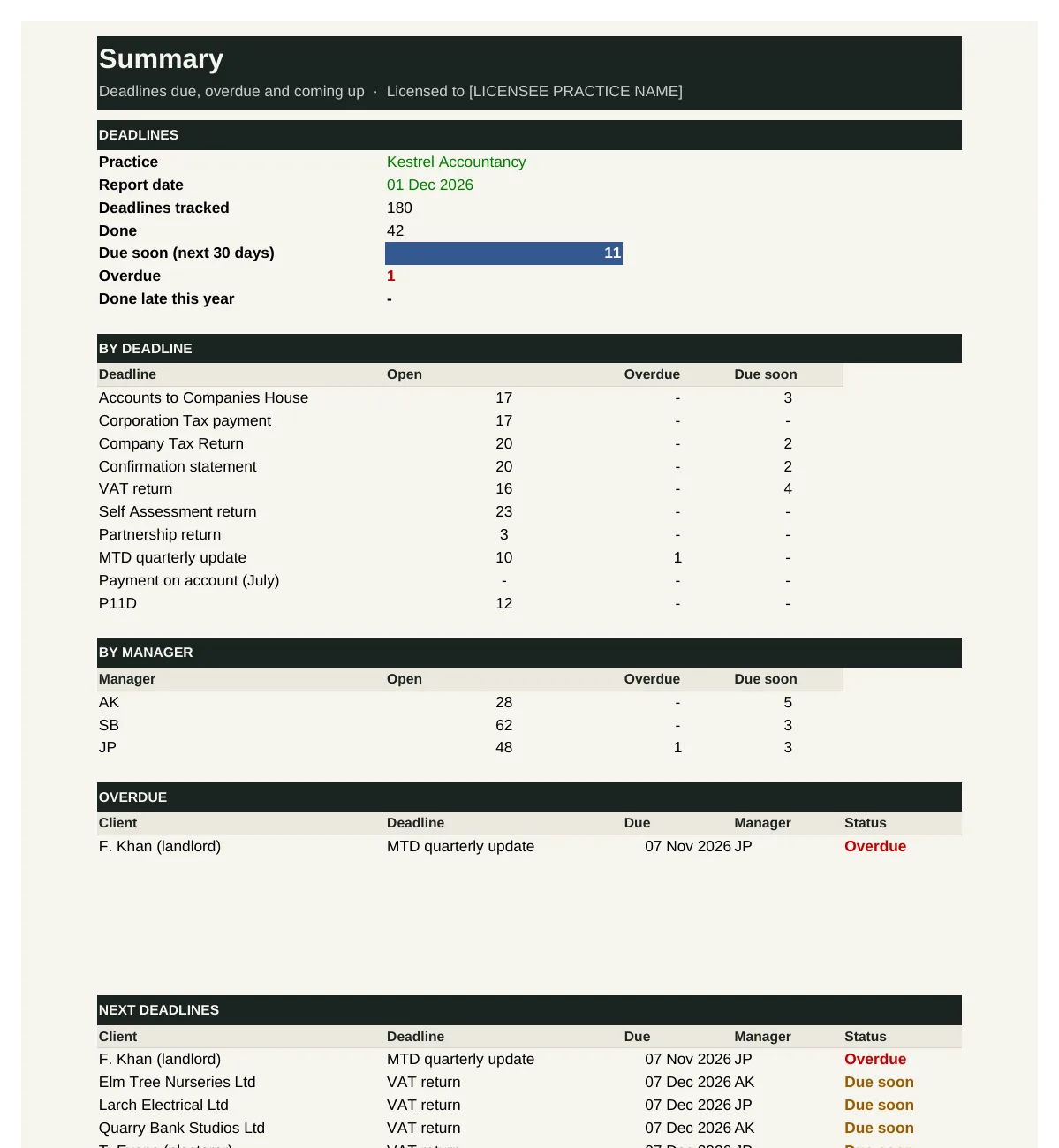
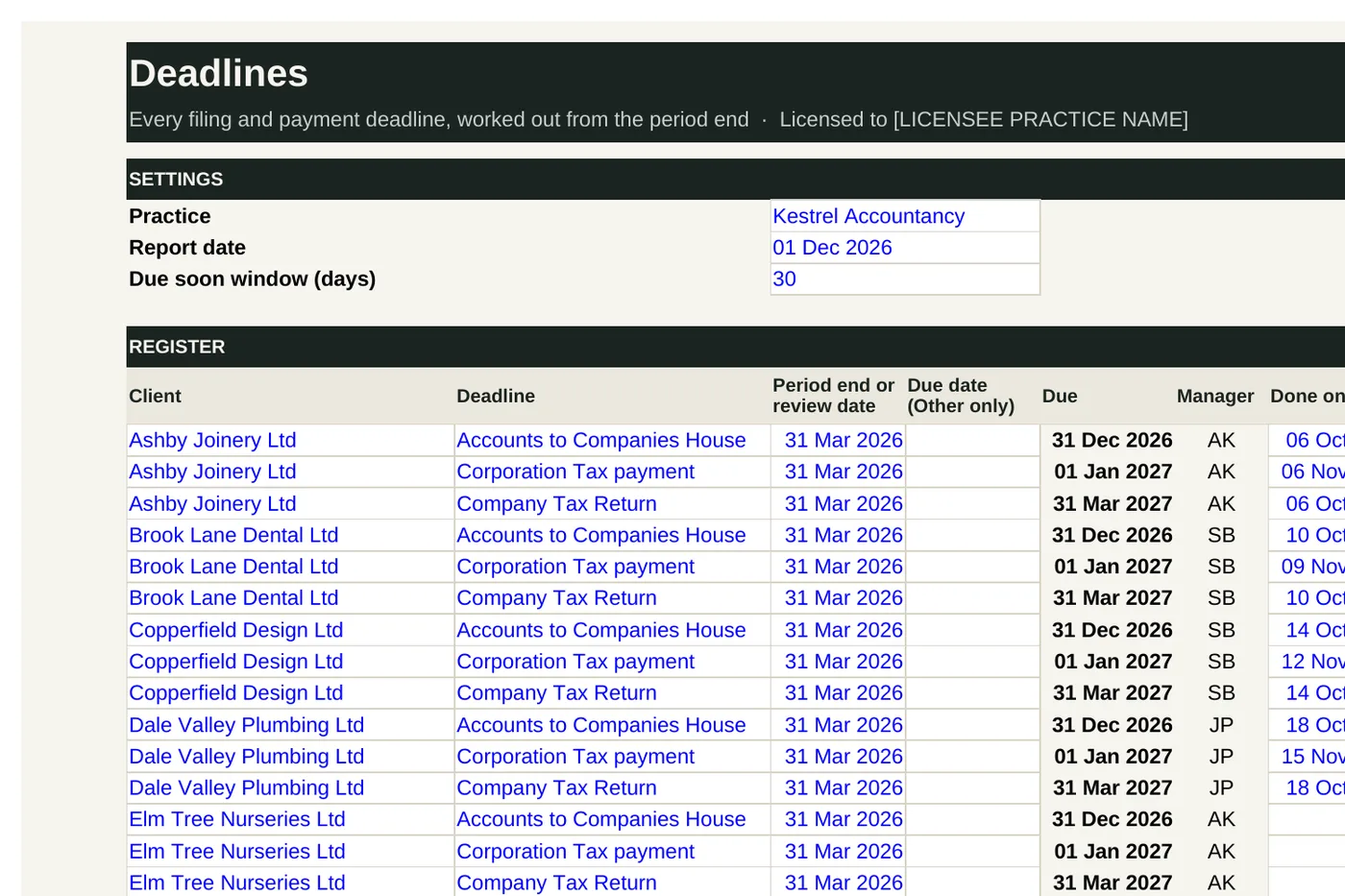
WF-01 works out each client's filing and payment deadlines from the period end, using the rules for Companies House accounts and confirmation statements, Corporation Tax, VAT, Self Assessment, Making Tax Digital quarterly updates and P11Ds. It shows the days left and a status for every deadline, lists what is overdue and due next, and counts open deadlines by manager.
Who it's for: Partners, managers and practice managers who need every filing and payment deadline in one place.
You enter: Deadline, Period end, Done on, Income.
You get: Due, Days left, Status, MTD from.
Tabs: Summary · Clients · Deadlines · Rules
Practice deadline calendar
See the busy months coming, months ahead.
WF-02 takes the deadlines from WF-01 and lays them out month by month for the year ahead, by type: Companies House, Corporation Tax, VAT, Self Assessment, MTD updates and payroll. It marks the busy months and shows the next 13 weeks week by week, so you can plan staff time and holidays around the peaks.
Who it's for: Partners and practice managers planning the year's workload, staffing and holidays.
You enter: Calendar starts, Busy month, Due, Done on.
You get: By month, Busy, Next 13 weeks, Busiest month.
Tabs: Summary · Deadlines · Calendar
VAT and MTD quarters planner
Every VAT return and MTD update, on time.
WF-03 works out each VAT client's next period end and return date from their VAT quarters, and flags any earlier return not yet submitted. For Making Tax Digital for Income Tax it works out when each sole trader and landlord joins, from their qualifying income, and tracks the four quarterly updates for every client already in.
Who it's for: Practices filing VAT returns and Making Tax Digital quarterly updates for their clients.
You enter: VAT quarters, Last period submitted, Qualifying income, Q sent.
You get: Period end, Due, In MTD from, Missed.
Tabs: Summary · VAT · MTD
Payroll and pensions calendar
Every payday, payment and re-enrolment date in view.
WF-04 lists each payroll client's next payday and works out the Full Payment Submission and PAYE payment dates, the next automatic enrolment re-enrolment date and declaration of compliance, and whether P11Ds are needed. It flags what is due this week and re-enrolments coming up.
Who it's for: Practices running payroll for clients, and the person who processes it each week and month.
You enter: Next payday, Benefits payrolled, Pension duties started, Last re-enrolment.
You get: PAYE due, Next re-enrolment, Declaration by, This week.
Tabs: Summary · Payroll
Jobs and stages bundle
Every job, its stage and what's missing.Job register
Every job, its stage and who owns it.
WF-05 keeps one line for every job: client, service, period, due date, owner, stage, budget hours and fee. It shows the days left and flags jobs that are at risk, because they are close to the deadline and still waiting for records, and jobs that are overdue. The Summary counts jobs by stage and owner.
Who it's for: Partners and managers who need to know where every job is and which ones are in trouble.
You enter: Service, Due, Stage, Budget hours.
You get: Days left, At risk, Overdue, Fees not yet filed.
Tabs: Summary · Jobs
Job stage checklists
The same standard on every job, every time.
WF-06 holds the standard steps for each service (year-end accounts, Self Assessment, VAT returns and payroll) and turns them into a checklist for one job. Pick the service and the steps appear; tick each one off with initials and date, and record the review and partner sign-off.
Who it's for: Preparers and reviewers who want every job done the same way, with a record of who did what.
You enter: Service, Done, By, Sign-off.
You get: Steps, Complete, Status, Red step.
Tabs: Summary · Job · Templates
Records received tracker
Know what's missing, and chase it before it's urgent.
WF-07 logs every item asked for from a client: what, when it was requested and chased, and when it arrived. It works out how long each item has been waiting and when to chase next, and marks items Urgent when the job they belong to is due soon.
Who it's for: Anyone in the practice who asks clients for records and has to chase them.
You enter: Item needed, Requested, Last chased, Job due.
You get: Days waiting, Next chase, Urgent, Outstanding.
Tabs: Summary · Records
Work-in-progress board
The whole practice's work on one board.
WF-08 is a work-in-progress board. Every open job sits in a column for its stage, from Not started to With client to approve. It counts how long each job has been at its stage, marks jobs stuck longer than they should be, and flags jobs at risk where the typical time to finish runs past the due date.
Who it's for: Partners and managers running the weekly work-in-progress meeting.
You enter: Stage, At this stage since, Days at this stage (max), Days to finish.
You get: Days at stage, Expected filing, At risk, Stuck.
Tabs: Summary · Jobs · Board · Stages
Team capacity bundle
The hours you need against the hours you have.Team capacity planner
See the crunch weeks before they arrive.
WF-09 sets each person's free hours each week (chargeable hours, less regular work and time away) against the deadline work falling due, spread over the weeks before each due date. It shows the gap for each person and the team, week by week for 13 weeks, so you can move work, share it or get help before a week goes short.
Who it's for: Partners and practice managers planning who does what in the weeks ahead, especially in the busy season.
You enter: Chargeable, Other regular work, Hours left to do, Spread over.
You get: Free, Needed, Gap, Team gap.
Tabs: Summary · Team · Absence · Jobs · Capacity
Job budget and time tracker
Know which jobs pay, and which ones run over.
WF-10 keeps a budget and fee for each job and a log of time spent. It totals hours for each job, shows budget used and hours left, works out the fee per hour, and flags jobs over budget, nearly used or below your target rate.
Who it's for: Partners and managers who set fees and budgets, and want to see where time really goes.
You enter: Budget hours, Fee, Time, Target fee per hour.
You get: Hours spent, Budget used, Fee per hour, Over budget.
Tabs: Summary · Jobs · Time
Busy-season planner
Get through January without the all-nighters.
WF-11 plans the Self Assessment season week by week: the returns you aim to file each week, the hours they need and the hours set aside for them. It tracks returns filed against the plan, shows the weeks that are short of time, and works out how many returns a week you need to finish by the deadline.
Who it's for: Partners and managers planning the Self Assessment season.
You enter: Returns to file, Hours per return, Returns planned, Hours available.
You get: Behind plan, Gap, Returns needed each week, Hours short in total.
Tabs: Summary · Plan
Holiday and absence planner
Holidays planned around the deadlines, not into them.
WF-12 records every holiday, sickness and training day, counts working days (excluding weekends and bank holidays), and keeps each person's holiday taken, booked and left. It flags any holiday that falls in the busy season and shows days away week by week, ready to feed into the capacity planner.
Who it's for: Practice managers and partners approving holidays and keeping track of absence.
You enter: Allowance, From and To, Approved, Busy season.
You get: Working days, Left, In busy season, Days away.
Tabs: Summary · Team · Absence · Weeks
Client chasers bundle
Chase records early, and never miss a deadline.Client chaser schedule
The right chaser, to the right client, at the right time.
WF-13 sets four chase dates for every client whose records you need, counted back from the deadline (90, 60, 30 and 14 days by default). It works out the next chase after your last one, and lists who to chase now and this week, with how they prefer to be contacted. Chasers stop once the records arrive.
Who it's for: Anyone in the practice responsible for getting records in on time.
You enter: Deadline, Last chased, Records in, Days before.
You get: Chase dates, Next chase, Which, Status.
Tabs: Summary · Chasers
Chaser message templates
Polite, clear chasers in seconds.
WF-14 holds chaser wording for each job and each chase (first, second, third and final), with placeholders. The Builder tab fills in the client's name, the period, the records needed, the dates and your details, ready to copy into an email. A Sent tab keeps a log of every chaser.
Who it's for: Anyone who chases clients for records and wants consistent, professional wording.
You enter: Job and chase, Records needed, Ask by, Deadline.
You get: Subject, Message, Sent, By chase.
Tabs: Summary · Builder · Templates · Sent
Late filing risk register
No late filing comes as a surprise.
WF-15 is a register of deadlines at risk of being missed. For each one it records why, who owns it, the action agreed and whether the client has been told. It shows the days left and the first penalty if it is missed, and flags anything already missed or where the client hasn't been told in time.
Who it's for: Partners who need to know which deadlines are at risk, what's being done and whether the client knows.
You enter: Why at risk, Action agreed, Client told, Status.
You get: Days left, First penalty, Check, At stake.
Tabs: Summary · Register · Penalties
Workflow dashboard
How the practice is running, on one page.
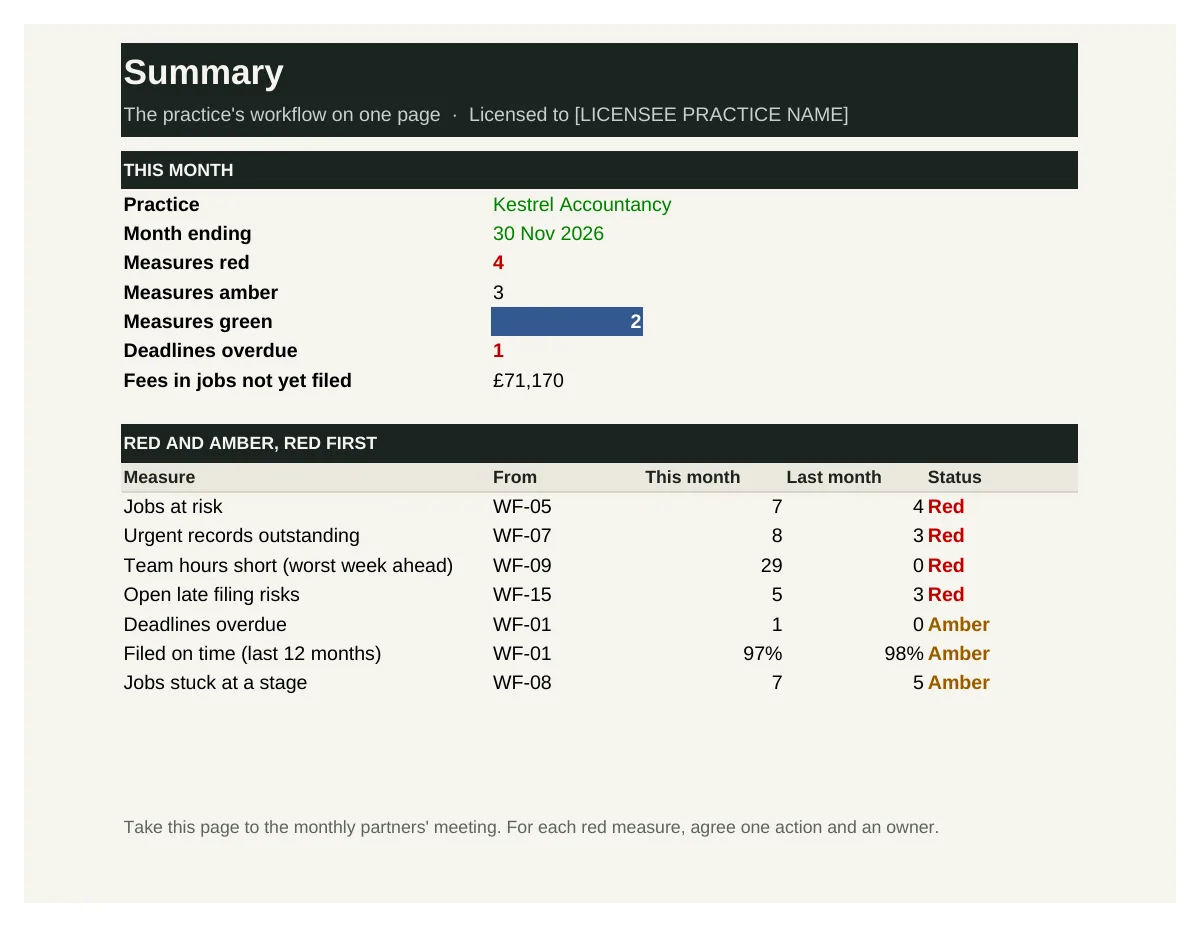
WF-16 brings the key measures from the other Workflow Desk tools onto one page: overdue deadlines, jobs at risk and stuck, urgent records, capacity, late filing risks, fees in progress and filing on time. Each measure is rated red, amber or green against thresholds you set, with the change from last month and a six-month trend.
Who it's for: Partners and practice managers reviewing workflow each month.
You enter: This month, Green if within, Amber if within, Better if.
You get: Status, Change, Measures red, Trend.
Tabs: Summary · Measures · Trend
See inside
Real screens from the workbooks
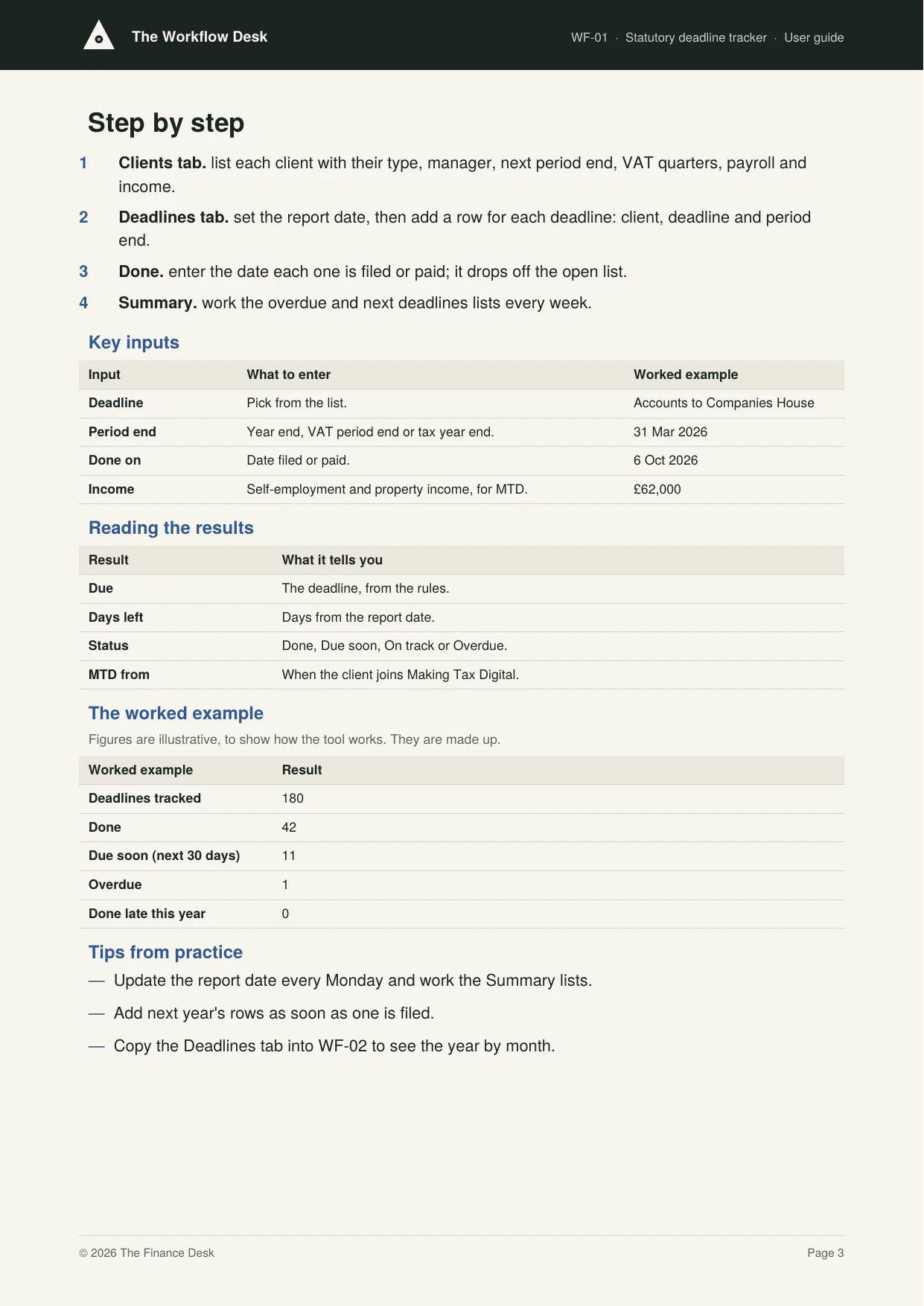
Taken straight from the tools with the worked example filled in, so you can see exactly what you get before you buy.
In every tool
How it works
1 — Download
Buy a single tool, a bundle or the whole desk. Each one is licensed to your practice and sent by email.
2 — Set up once
Enter your clients, year ends, services and team, using the user guide.
3 — Plan and deliver
Track every deadline and job, plan the team's weeks and chase records early.
Pricing
Buy what you need, or get everything
Single tool
£95–£295
One workbook with its user guide and worked example.
Start here
Bundle of four
£395–£595
Four tools that work together. The deadlines bundle is the place to start.
Full Workflow Desk
£1,495
All 16 tools and guides, yours to keep, with 12 months of updates and the monthly Q&A call. Then £395 a year to keep updating.
The Full Suite
£5,950
All six desks and all 96 tools, yours to keep, with 12 months of updates and the monthly Q&A call. Then £1,190 a year to keep updating.
Founding members: £4,450, with updates at £890 a year for life, for the first 50.
Set-up service
Your figures loaded for you · from £1,500
We load the tools with your own clients, services, fees, team and rates, so they're ready to use from day one.
Prices exclude VAT. Single tools, bundles and desks are for one practice and yours to keep. See pricing for every desk
Written by people who have done the job
The Workflow Desk is built with accountants who have run practices through the January peak and every year end, and know what slips when nobody is watching.
Every tool is built from that experience: the records and controls a well-run practice relies on, in a form you can pick up and use the same week.
Become a founding member
The first 50 founding members get The Full Suite, all six desks and 96 tools, for £4,450 instead of £5,950, with updates at £890 a year fixed for life.